
How we send files over QR codes: a fountain code, a 30x faster encoder and a camera pipeline in Flutter
Magical Share moves a file from one screen to another camera with nothing in between. Here is how the pipeline works, the numbers behind it, and the bottleneck we did not expect.
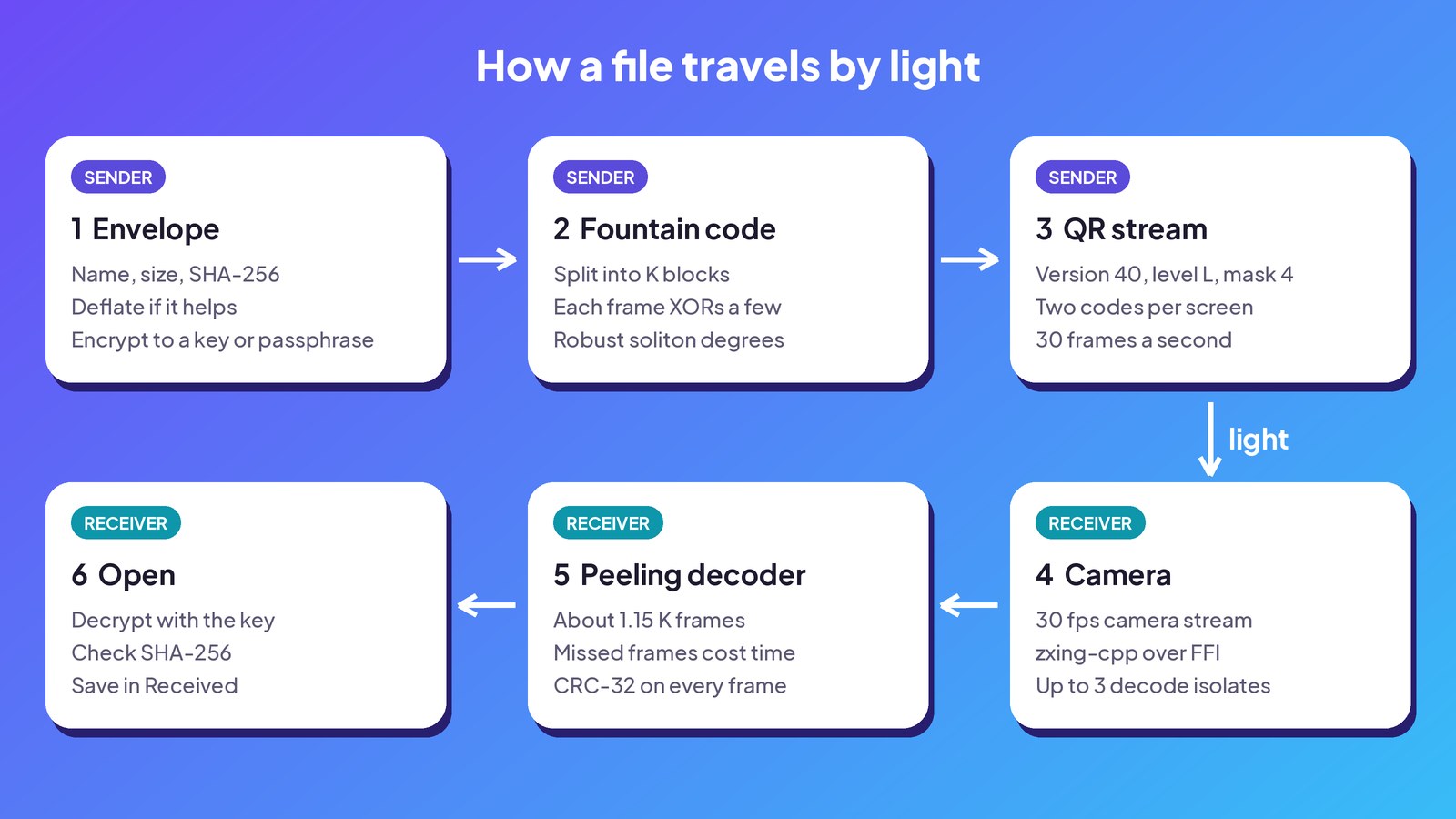
Magical Share sends files between nearby devices with nothing but light. One screen plays a stream of QR codes, and a phone camera reads them back into the file. There is no Wi-Fi, Bluetooth or internet anywhere in the path. The product walkthrough shows it from the user's side, and the web app lets you try sending from a browser.
This post is about the engineering. A camera pointed at a screen is a noisy, one-way channel, and four problems decide whether it works:
- The receiver misses frames: motion blur, glare, autofocus, a hand that wobbles.
- The sender has to draw about 60 large QR codes a second, including in a browser on a single thread.
- The phone has to decode them at camera speed.
- Anyone in the room can film the screen.
Everything below is Dart and Flutter, running on Android, iPhone, macOS and the web from one codebase.
Why a fountain code
The obvious design is a carousel: number the chunks, loop through them, and let the receiver collect what it missed on the next lap. It works, but the tail is slow. Once you have 95% of the chunks, you wait for exactly the missing ones to come around again, and missing one of those costs another full lap.
A fountain code removes the "exactly". We use a Luby transform (LT) code. The file is split into K source blocks, and every frame carries the XOR of a few of them. Any set of slightly more than K frames rebuilds the file, no matter which ones you caught. The receiver can join halfway through the stream, and a missed frame costs one frame of time, not a lap.
We chose the design by simulation. A systematic carousel needed 1.43 K frames at 2,000 blocks, even with no loss at all. The LT code needed about 1.15 K frames for a receiver joining mid-stream, whatever the loss rate.
The degree of each frame, meaning how many blocks it mixes, comes from a robust soliton distribution with c = 0.1 and δ = 0.5. Most frames mix a handful of blocks, a few mix many, and some carry a single block. The receiver runs a peeling decoder. Each single-block frame reveals a block, and XORing that block out of the waiting frames turns some of them into new single-block frames. That repeats until all K blocks are known.
Both sides must pick the same blocks
A frame doesn't list the blocks it mixed. Its header carries the session id, the sequence number and the degree, and both sides derive the block indices from those three numbers with a small integer-only random number generator:
List<int> blockIndicesFor({sessionId, seq, k, degree}) {
  if (degree == 1) return [seq % k];
  final rng = Xorshift32(mix32(sessionId ^ mix32(seq)));
  // ...then pick `degree` distinct indices below k
}
Integer-only matters because the same derivation runs as native code on phones and as JavaScript or WebAssembly in the browser. Floating point appears in one place only: the sender samples the degree from the soliton distribution and writes it into the header, so a rounding difference there can't put the two sides out of step. Golden tests pin the derivation, and changing it would need a new wire version.
Each frame starts with a 28-byte header:
| Bytes | Field |
|---|---|
| 2 | Magic, MS |
| 1 | Wire version |
| 1 | Flags |
| 4 | Session id |
| 4 | Sequence number |
| 4 | K, the number of source blocks |
| 2 | Block length |
| 4 | Envelope length |
| 2 | Degree |
| 4 | CRC-32 of the header and payload |
The receiver checks the CRC and the header's limits before it allocates anything, so a hostile code can't make it reserve gigabytes.
Drawing 60 QR codes a second
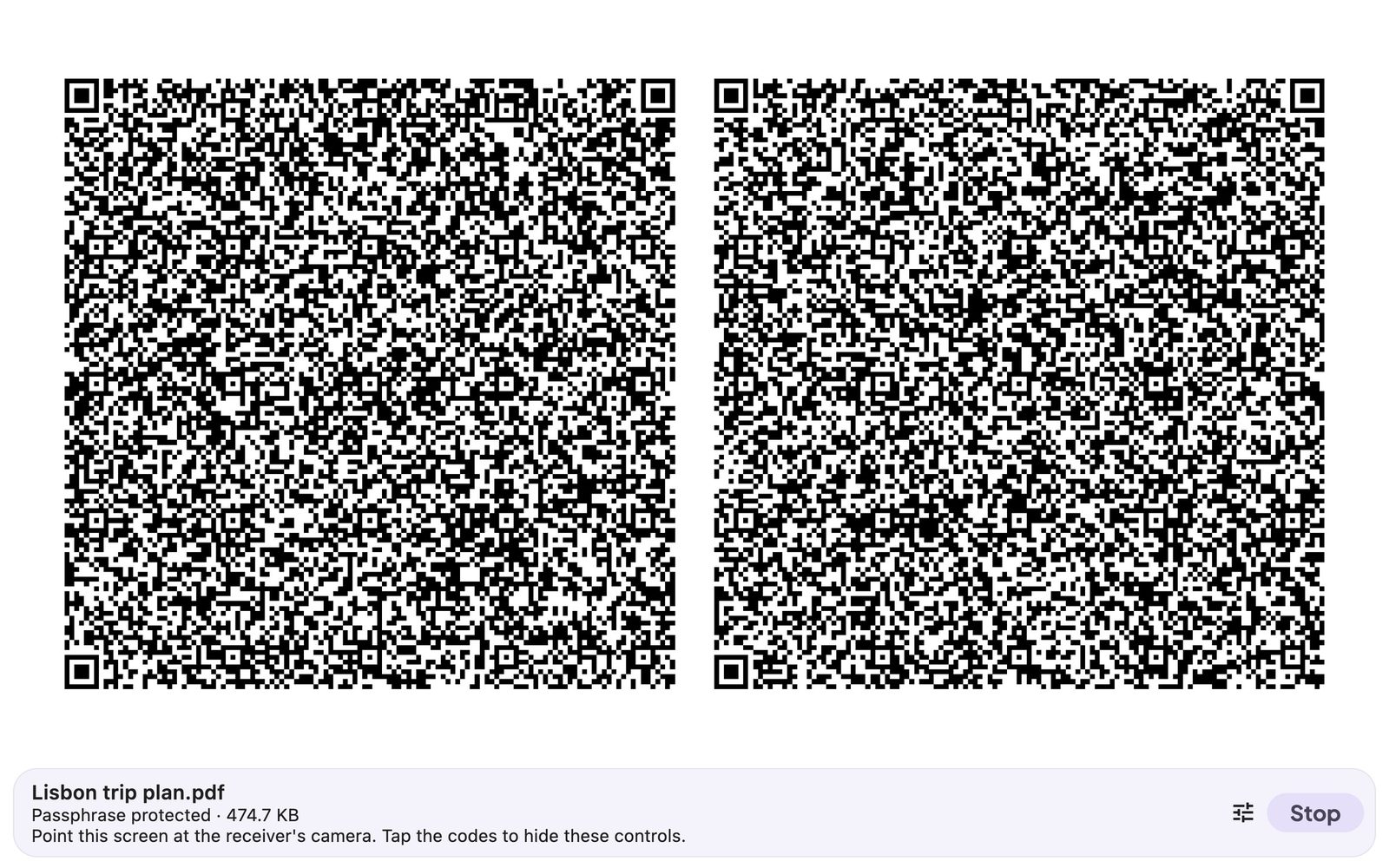
Each frame goes into a version 40 QR code, the largest there is: 177 × 177 modules holding up to 2,953 bytes at error correction level L. L is the weakest level, and that's fine here. The fountain code already treats a code that fails to decode as one lost frame.
We also skip the mask search. A normal QR encoder tries all eight masks and scores each one, which is most of the work for a large symbol. Every mask is valid for a decoder, so the stream always uses mask 4. In our experiments a fixed mask decoded as reliably as the search for dense frames.
With the mask fixed, almost everything about a version 40 symbol is constant: the finder and timing patterns, the order data bits are placed in, which bits the mask flips, and the Reed-Solomon generator polynomials. Our encoder computes those once and caches them. Each new frame only builds its codewords, computes error correction with log tables and drops the bits into place. It produces exactly the same symbols as package:qr, about 30 times faster. That is what makes the web app possible, where the whole stream runs on one browser thread.
The sender offers three speeds:
| Preset | Bytes per code | Codes per screen | Frames a second | Ceiling |
|---|---|---|---|---|
| Fast | 2,953 | 2 | 30 | 171 KB/s |
| Balanced | 1,465 | 2 | 30 | 84 KB/s |
| Robust | 700 | 1 | 20 | 13 KB/s |
The ceiling assumes every code is caught. Real transfers catch a fraction of them, which is where the fountain code earns its keep.
Reading at camera speed
On the phone, camera frames go to background isolates that decode with zxing-cpp through FFI. We run one worker for every two CPU cores, up to three, so decoding never blocks the camera or the interface. In field tests a frame took 4 to 45 ms to decode, and no frame was dropped for lack of a free worker.
The surprise was the camera, not the decoder. Our first Android build used the CameraX implementation of Flutter's camera plugin. It fetched each frame's image planes over extra platform-channel round trips and waited for them before delivering the next frame. We asked for 60 fps and got 6 to 12. With a Mac sending to a Galaxy A53, 650 KB took 45 to 50 seconds, about 13 KB/s.
Switching to camera_android, the Camera2 implementation, fixed it, because it sends each frame in one message. At 720p and 30 fps, the same phone received 1.9 MB in 39.5 seconds: 48 KB/s. It caught only 32% of the frames over the run and still finished. With a carousel, a 32% catch rate would have meant lap after lap.
Safe even if someone films the screen
A screen is a broadcast medium, so the file is sealed before it becomes codes. The envelope holds the file name, type, size and SHA-256 hash. The body is compressed with Deflate when that makes it smaller, and then encrypted.
- Key mode. The receiving phone makes a fresh X25519 key pair every time its Receive screen opens, and shows the public key as a QR code. The sender scans it, derives a key with HKDF-SHA256 and encrypts with ChaCha20-Poly1305. Both screens show an eight-digit check number taken from the SHA-256 of the public key, so two people can confirm they locked onto the same phone. Receive keys are never stored.
- Passphrase mode. For when scanning isn't practical. The key comes from Argon2id with 19 MiB of memory and 2 iterations, the OWASP minimum. The cost settings travel in the envelope, and the receiver refuses settings outside safe limits, so a hostile sender can't make it burn gigabytes of memory.
- Open mode. No encryption, with a warning before sending.
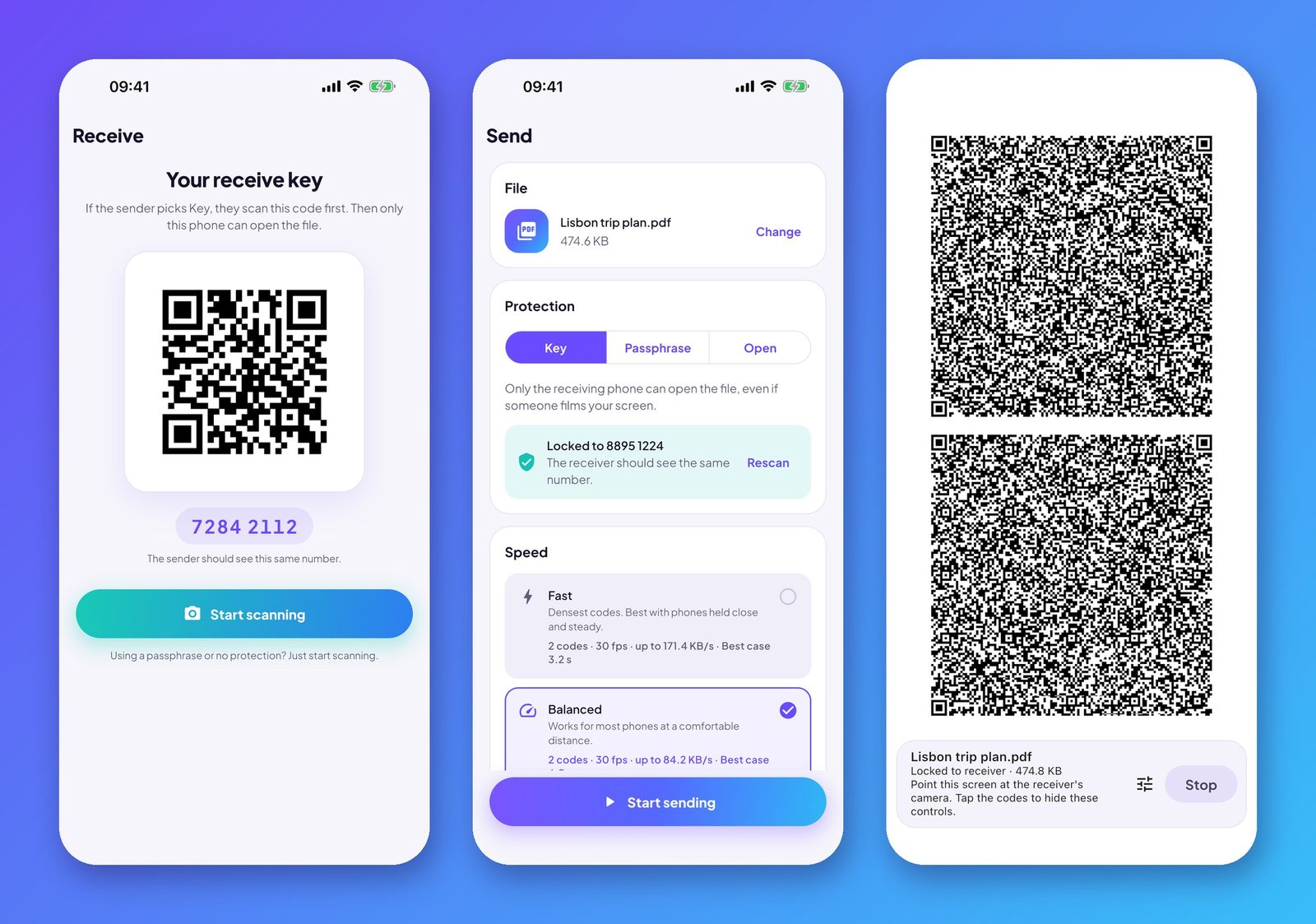
The envelope's protection header is authenticated as associated data, so it can't be swapped. The receiver refuses compression bombs and cleans file names so they can't escape the save folder. After decrypting, it checks the SHA-256 of the whole file before showing it.
Testing a channel made of light
Most of this is testable without a camera:
- The codec, crypto and fountain tests run as plain Dart.
- A pipeline test renders the sender's stream to pixels, decodes the codes from those pixels with an independent decoder, and rebuilds the file.
- Golden tests pin the block-index derivation, so a harmless-looking refactor can't break compatibility with apps already installed.
Field tests cover the rest: real screens, real cameras and real hands. While it works, the receiver shows the camera frame rate, decode time, codes per second, the share of frames caught, and the speed. That is how we found the CameraX bottleneck.
No internet, really
The Android release build doesn't declare the INTERNET permission, so the app cannot open a network socket at all. We also strip the network-state, audio and storage permissions that plugins add. The Mac build is sandboxed with no network entitlement. Google Play Billing still works, because the purchase runs inside the Play Store app; we confirmed it with a test purchase on a release build.
If you build one
- Use a fountain code from day one. It makes every other problem cheaper.
- Measure the camera's frame rate before you optimize the decoder. Ours was the bottleneck by a factor of three.
- Keep everything both sides compute in integers, and pin it with golden tests.
- Expect 50 to 100 KB/s with ordinary phones. That is right for documents, photos, keys and boarding passes, not for videos.
You can try the sender in your browser at apps.zincirx.com/magicalshare/web and catch the file with Magical Share for Android. Questions about the design are welcome at info@zincirx.com.